
Language
NORDICGAMING BROWSER Go to Discord

NORDIC GAMING BROWSER

Your browser
optimized to win.

More games. More control. Nordic Gaming Browser brings together performance settings, customization and exclusive tools to take your gaming experience to the next level.

Optimized
performance
Latency
control
DNS
encrypted
Exclusive
tools

For Windows Sign in with Discord inside Nordic

Nordic emblem: a blue and silver dragon over the letter N.

NORDICGAMING BROWSER

The first optimized gaming browser.
Built for performance, built to win.

⌄

MANY GAMES. ONE BROWSER.

Your next match.
Always within reach.

From a match in HaxBall to strategy in OGame. Enjoy your web games with shortcuts and settings to optimize your experience.

HaxBallKrunker.ioAgar.ioSlither.ioOGameTravianHero WarsVikings: War of Clans
Nordic Gaming Browser bar with shortcuts to HaxBall, Krunker.io, Agar.io, Slither.io, OGame, Travian, Hero Wars and Vikings: War of Clans.
Your games, one click away. Actual Nordic Gaming Browser screenshot.

HaxBall-specific tools apply to that game. Each title has its own requirements, availability and terms.

MEET THE PRODUCT

What Nordic is.
What you buy.

Nordic Gaming Browser is a Chromium-based browser for Windows, designed for web games with optimized performance, customization and additional tools for HaxBall.

Browser access

We offer paid access to Nordic Gaming Browser and its included features: browser and Windows settings, themes, resolution, account levels and HaxBall tools such as FPS, keyboard and chat controls and replay analysis.

You can review each group of features in the product description.
A personal-use license

You buy temporary access to the browser, linked to your Discord account. The monthly plan allows one device and one simultaneous session.

You need 64-bit Windows, a Discord account and an Internet connection to sign in and validate access. Check your device's compatibility before paying.

Price and terms

Digital product for Windows. Performance depends on your device and settings; rendering adjustments do not reduce your connection's ping.

THE GAME, UNDER YOUR CONTROL

The settings that
shape your game.

Set up the browser your way and use the dedicated HaxBall tools, from FPS limits to match analysis.

01 PERFORMANCE

Find your rhythm.

Choose your FPS limit or disable it, adjust graphics quality and select a rendering latency mode for HaxBall.

FPS · Graphics · Latency
02 CONTROLS

Fine-tune every keystroke.

Configure keyboard delay and repeat with Filter Keys. Use the presets or set your own values.

Filter Keys · Keyboard settings
03 CUSTOMIZATION

Make it yours.

Combine browser themes with HaxBall's HTML5, Flash or Nordic appearances. Customize avatars, reactions and team images.

Themes · Avatars · Teams
04 IN THE MATCH

More within reach.

Access the emoji picker, chat controls and room tools. Adjust chat visibility and use administration actions when you have permission.

Chat · Emojis · Rooms
05 AFTER THE MATCH

From replay to report.

Analyze HaxBall replays, review statistics and prepare a report formatted for Discord. You can also save it as text.

Replays · Statistics · Reports
06 YOUR BROWSER

Everything in its place.

Choose your home page, organize bookmarks and check history and downloads. Save and load your settings with .CFG files.

Home · Bookmarks · Settings

Performance depends on your hardware and settings. Latency modes adjust game rendering; they do not change your connection's ping.

FEWER DISTRACTIONS. MORE GAMING.

Performance
in your hands.

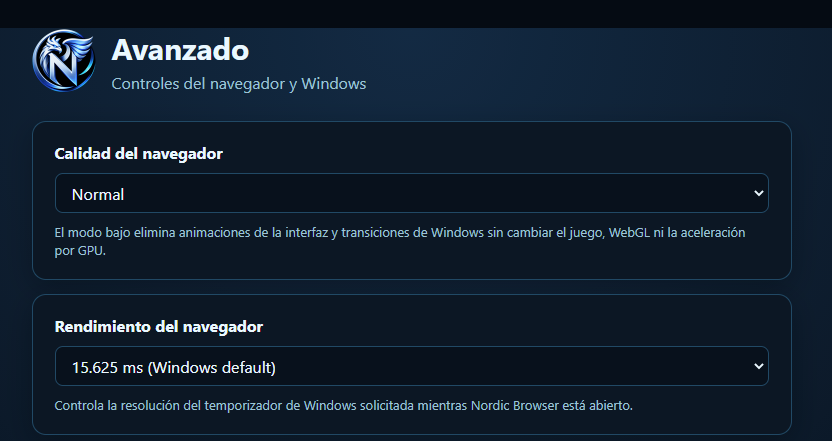
Adjust interface quality and the Windows timer resolution from the browser itself.

PERFORMANCE AND WINDOWS01 / CONTROL
Nordic advanced options: browser quality and Windows timer resolution.
Real controls, accessible from advanced options.
MADE FOR THE WAY YOU PLAY

Choose where
to focus.

Reduce interface animations with low-quality mode, without changing the game, WebGL or GPU acceleration.

Customize the Windows timer while Nordic is open and find the settings that best suit your device.

Explore more settings

EVERY MATCH COUNTS

Play. Level up.
Make it yours.

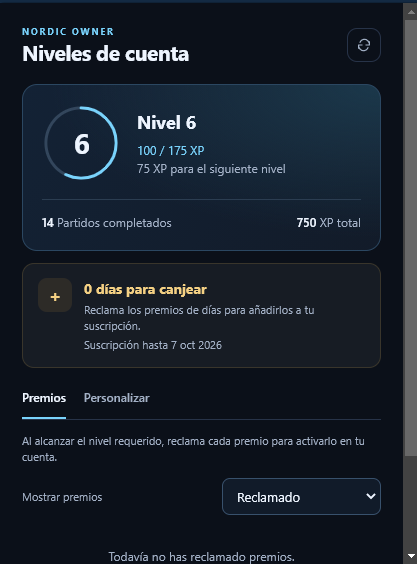
Track your HaxBall progress from your Nordic account. Check your XP, the next level and available rewards in one place.

  • Your progress, visible

    Review completed matches and the experience you need to reach the next level.

  • Rewards for your account

    Check rewards and claim those you have unlocked, including subscription days when available.

  • Rewards and customization

    Access your account tabs and review your rewards from the browser.

Levels panel: level 6, progress of 100 out of 175 XP, completed matches and rewards and customization tabs.
Example view of the levels panel. Progress and rewards depend on each account.

TAILORED TO YOUR SCREEN

Your space.
Your settings.

Adjust how the game looks, from the window to the finest detail.

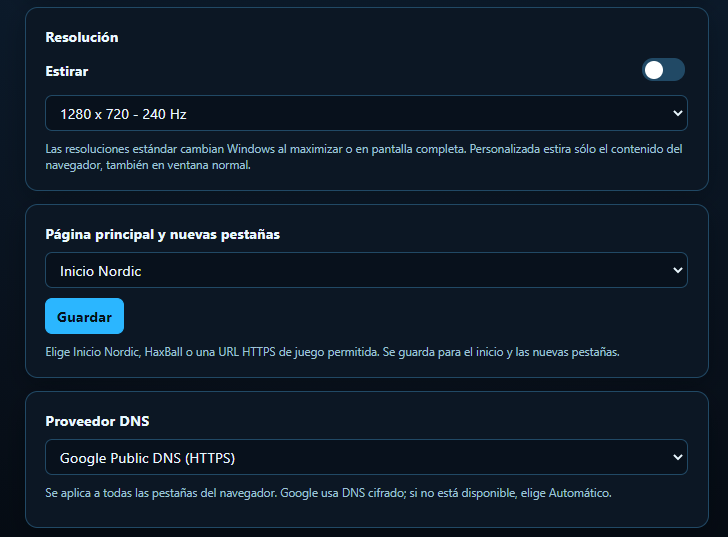
  • Resolution and stretching

    Use a standard resolution or enable Stretch to set a custom internal resolution, including in a normal window.

  • Your preferences, saved

    Keep your settings and save them to a .CFG file so you can load them again whenever you need.

  • In your language

    The interface is available in Spanish, English and Portuguese, with themes that also apply to the browser.

8 ways to make it yours.
ADVANCED OPTIONS02 / SETTINGS
Advanced options: resolution with Stretch, home page and encrypted DNS provider.
Custom resolution stretches browser content without changing the Windows resolution.

ACCESS TO NORDIC

Your monthly plan.

Sign in with Discord and buy your subscription inside Nordic Gaming Browser. You can pay with Webpay or PayPal.

MONTHLY PLAN · PERSONAL USE

Webpay

$2.999 CLP / month

Pay with Webpay

  • Browser features described on this page.
  • Access linked to your Discord account.
  • One device and one simultaneous session.
  • No automatic renewal.
  • Digital delivery, with no shipping costs.
Go to Discord

Payment in Chilean pesos. Purchase inside Nordic Gaming Browser.

MONTHLY PLAN · PERSONAL USE

PayPal

$3.99 USD / month

Pay with PayPal

  • Browser features described on this page.
  • Access linked to your Discord account.
  • One device and one simultaneous session.
  • No automatic renewal.
  • Digital delivery, with no shipping costs.
Go to Discord

Payment in US dollars. Purchase inside Nordic Gaming Browser.

EVERYTHING INSIDE NORDIC

Your account and subscription,
inside the browser.

Open Nordic Gaming Browser and sign in with your Discord account. You can buy your subscription and check your access from the browser.

Select your plan inside Nordic, choose Webpay or PayPal and continue to payment. Review the total amount, currency and access dates before paying. This website presents the product and connects you with our community and support.

When the period ends, you need to renew your access to continue. There are no automatic charges.

DIGITAL DELIVERY

From purchase
to your first match.

Start in our community. Discord sign-in and subscription purchases take place inside Nordic Gaming Browser.

  1. Get Nordic

    Join our Discord to get the official link and installation instructions for Windows.

  2. Sign in with Discord

    Open Nordic Gaming Browser and sign in with your Discord account from the browser. Your access is linked to that account.

  3. Buy inside Nordic

    Choose the monthly subscription from the browser and pay with Webpay ($2.999 CLP) or PayPal ($3.99 USD). Review the amount before confirming payment. Nordic checks your subscription to enable access.

If you need help with the installer, your subscription is missing or you need to change devices, write to noordicdev@gmail.com. Business days are Monday to Friday, excluding public holidays in Chile. If we cannot deliver access, we refund your payment.

BUY WITH CONFIDENCE

Refunds
and cancellations.

Last updated: September 18, 2026.

Refund within 10 days

You can request a full refund within 10 calendar days of payment, even if you have already activated access. This is our commercial policy and does not limit your legal rights.

Delivery, access or billing problems

If you were charged twice, we did not deliver access or the product has a problem we cannot resolve, we will review your case to fix it or refund the corresponding amount. You can also submit these requests after the 10-day period.

How to request a refund

Use the contact form or write to noordicdev@gmail.com. Include the purchase date, transaction ID if available, your Discord username and a brief explanation. Do not send passwords or full card details.

Response and refund

We will respond within 2 business days. Once approved, we will initiate the refund within 5 business days, preferably through the original payment method. When the credit appears depends on the bank or provider; we will keep you informed of its status and any necessary alternative.

What happens to the license

A full refund cancels the access associated with that purchase. If you only want to stop using Nordic at the end of the period, you do not need to cancel future charges: the plan does not renew automatically.

DIRECT SUPPORT

Let's talk
about your access.

Questions about the plan, download, activation or refunds. We aim to respond within 2 business days.

noordicdev@gmail.com We're also on Discord

Submitting takes you to FormSubmit to complete its anti-spam verification. If you cannot complete submission, contact us directly by email or Discord.

Between 20 and 3,000 characters. If you have already purchased, you may include your Discord username and transaction reference. Do not include passwords or card details.

Submission is confirmed on the form service's page. Keep your message if an error appears and contact us by email.

YOUR DATA

Contact privacy.

Nordic Gaming Browser uses the name, email, subject and message you submit to answer your question and handle support or requests related to your purchase. We do not use this form to subscribe you to advertising.

The form is processed by FormSubmit and delivered to Nordic's support email. FormSubmit states that it retains submissions for 30 days. Review its privacy policy before submitting information. Anti-spam verification takes place on its service.

We retain the correspondence needed to handle your request and meet applicable obligations. You can ask about your data or request its correction or deletion by writing to noordicdev@gmail.com; we will tell you if we need to retain any information due to a legal obligation.

This information covers the website and contact form. Browser access uses your Discord account and subscription validation.

SEE YOU ON DISCORD

NORDIC COMMUNITY

Your next match
starts here.

Join the community, get Nordic Gaming Browser and receive help getting started. Your next match awaits.

Go to Discord

Discord sign-in · Subscription inside Nordic Gaming Browser · Payments with Webpay or PayPal